For a long time, browser extensions were one of those things nobody really paid much attention to. They were small, useful, and mostly harmless — ad blockers, password managers, PDF tools, note-taking apps. They made work easier, and that was the end of the story.
Then the AI boom happened.
Suddenly, everyone started installing extensions: tools that summarize emails, rewrite text, record meetings, analyze websites, generate content, or act as copilots for almost everything. Most of them promise productivity, and many of them actually deliver it – the problem is not that extensions exist. The problem is that in most organizations, they exist with almost no control, and that has quietly turned the browser into one of the biggest blind spots in modern enterprise security.
Why Browser Extensions Are Riskier Than People Think
From a user’s point of view, a browser extension feels lightweight. You click “Add to Chrome” or “Add to Edge” and that’s it. No installer, no admin rights, no warnings that feel serious. It feels closer to installing a mobile app than software on a corporate machine.
But technically, extensions can be extremely powerful.
Depending on their permissions, a browser extension can:
- Read and modify every page you visit
- Capture form inputs (including credentials)
- Inject scripts into websites
- Access cookies and session tokens
- Send data to external servers
- Update itself automatically
In other words, they sit inside the most trusted application in the enterprise — the browser — and often have visibility into everything a user does.
That alone should make them a high-value target
The Perfect Attack Vector
From an attacker’s perspective, browser extensions are almost perfect:
- They’re easy to distribute (official stores).
- Users install them willingly.
- They run inside trusted processes.
- They bypass many traditional security tools.
- They auto-update without user interaction.
Even legitimate extensions can become malicious. All it takes is;
- A compromised developer account.
- A sold extension.
- A malicious update.
- Or a supply chain attack.
And suddenly, a tool that was “safe” yesterday is exfiltrating data today – This has already happened multiple times in the real world
Recent ones;
https://layerxsecurity.com/blog/browser-extensions-gone-rogue-the-full-scope-of-the-ghostposter-campaign/
https://thehackernews.com/2025/12/darkspectre-browser-extension-campaigns.html
Why Traditional Security Misses This
Most security programs focus on:
- Endpoints
- Networks
- Cloud apps
- Identity
Browsers often fall into a weird gap. They’re “just software”, so they’re not treated like a control plane. And extensions are even worse — they’re user-installed, constantly changing, and rarely inventoried.

The Real Risk Isn’t Malware — It’s Data
The biggest risk with browser extensions is not ransomware or crypto miners.
It’s data leakage.
Extensions can see:
- Internal dashboards
- Customer data
- Source code
- Emails
- Tickets
- Financial systems
- Admin portals
And they can send that data anywhere, Sometimes intentionally. Sometimes accidentally. Sometimes because the extension got compromised and nobody noticed.
What to do about it
organizations that take this seriously all (should..) converge on the same model:
Visibility and monitoring
At least knowing what’s installed. (This starts with Discovery)
Block by default
Users cannot install random extensions.
Central allowlist
Only approved extensions are allowed.
Department-based access
Marketing gets SEO tools etc
Engineering gets dev tools etc
Finance gets finance tools etc
Simple request process
Users can request new extensions.
Security reviews them.
Approved ones are added.
Let’s open this envelop,
Step 1
- Inventory current extensions
- Export:
- Extension ID
- Publisher (or tool name)
- Number of users
- Department (if possible – usually you can correlate if data is on the same datalake)
- Classify:
- Business critical
- Nice-to-have
- Unknown
- Clearly risky (duh)
BTW, if you are using Cortex XSIAM (or XDR) , you can use this query (I know this is going to be helpful to some) to do initial discovery:
config case_sensitive = true |
preset = xdr_file
| filter agent_os_type = AGENT_OS_WINDOWS
| filter event_sub_type = FILE_CREATE_NEW
| filter causality_actor_process_image_name = "chrome.exe"
| filter action_file_path contains "\Webstore Downloads\"
| filter action_file_name not contains "Zone.Identifier"
| alter action_file_name = split(action_file_name, "_")
| arrayexpand action_file_name
| filter action_file_name not contains "crx"
| fields agent_hostname as Hostname, agent_ip_addresses, actor_effective_username as User, action_file_name as extensionID
Use OU-based GPOs or Intune groups.
Example structure:
/Users
   /Finance
   /Engineering
   /Marketing
   /Sales
   /Lazy Watermelon Drummers
Each OU / group has:
- Same block policy
- Different allowlist
So:
- Marketing gets SEO tools
- Dev gets GitHub extensions
- Finance gets PDF tools
Use:
- ServiceNow / Jira / Zendesk (Insert your posion :))
Workflow:
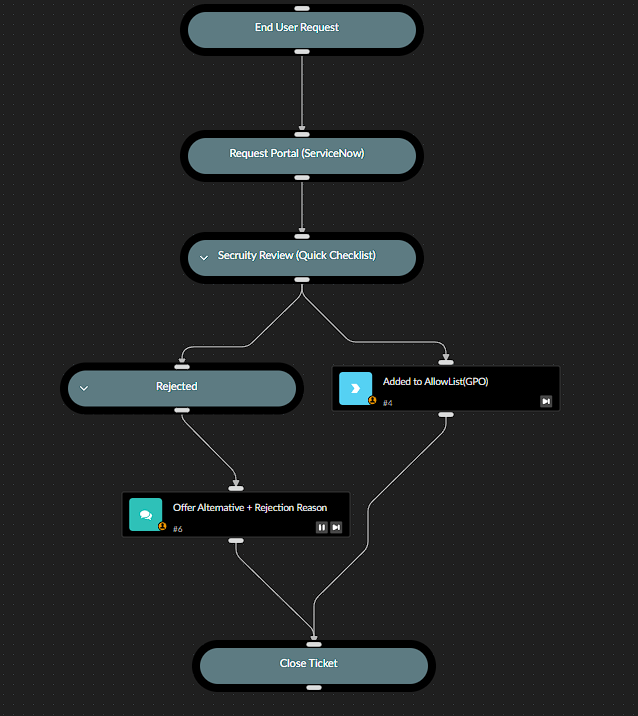
- User requests extension
- security checks
- Security approves
- Extension added to allowlist
- Reject? Offer alternative and or explain rejection reason
Here is some visuals to make more sense on this process
Governance Model (Who Owns What)
Pretty straight forward, this should be clearly communicated!
| Role | Responsibility |
|---|---|
| SecOps / SOC | Policy, blocking, final approval |
| IT Ops | GPO / Intune deployment |
| Dept Heads | Validate business need |
| End Users | Submit requests |
Now let’s talk Dugri (Incase you don’t live in Israel, read about ‘Dugri’: https://dugri.us/faqs/#:~:text=What%20does%20Dugri%20mean?%20Adapted%20from%20Turkish,is%20to%20tell%20it%20like%20it%20is.:
Or, another classic gem
https://www.youtube.com/watch?v=cMUJE2VEML0
You’ll likely end up with (or an abomination of sort)
- ~40–70 approved extensions total
- 5–10 per department
Ticket volume drops (should) after week 2
Communications
The key message to employees should be simple and consistent:
this change is about security and data protection, not about limiting productivity.
Your end-users should hear about the change in advance, understand why it’s happening, and know exactly what to do if they need a specific extension for their work, basiclly, surprises create resistance and transparency builds trust.
Make it very clear that:
- Legitimate business extensions are still allowed.
- Requests will be reviewed quickly.
- The goal is to enable safe usage, not block tools.